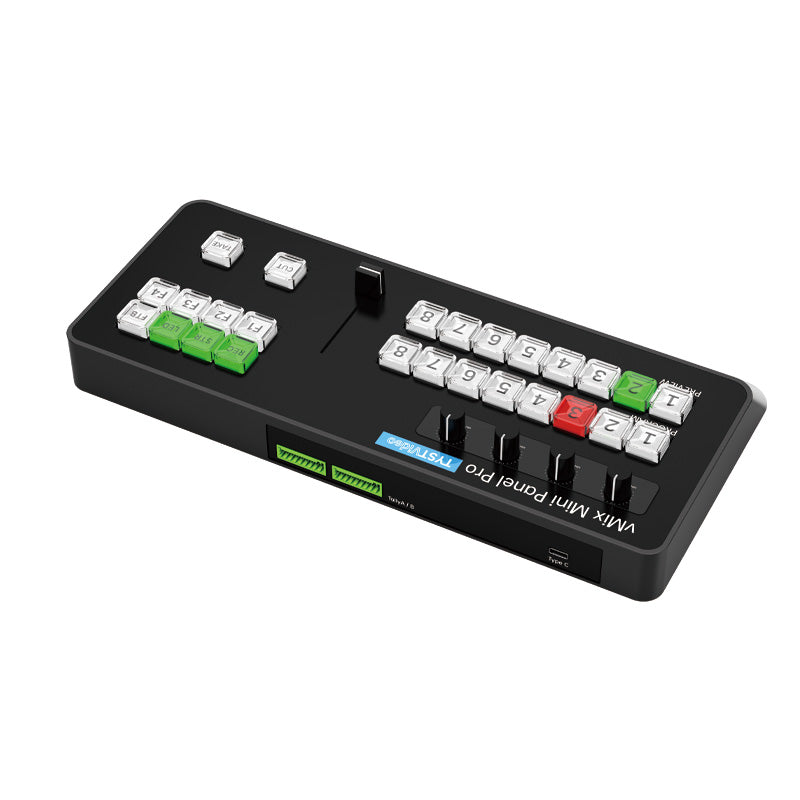
vmix controller
Switch with Ease: Experience seamless video production with 8-channel screen switching and a 4-way mixer. Capture your highlight moments with ease.
• Live Streaming Support: This device supports a variety of live broadcasts, making it a versatile choice for your streaming needs.
• Compact and Functional: Despite its small size, the Mini Vmix panel is packed with features, making it handy to operate.
• Broadcast-Quality Features: The Mini Vmix surface integrates video switching, resource recording, webcasting, mixing console, and special effects transitions.
• Multi-Screen Switching: With 16 video switching keys, this device can quickly switch multiple screens, making it suitable for large-scale multi-camera live production.
• USB Interface: The switcher comes with a USB input/output interface, allowing for simple and convenient transmission of video signals to live broadcast and video production software on the computer.
How to Configure the TYST VMIX Controller
With vMix
1. Before you start the install, download the Config File and save the file in a location that will be easy to locate.
DOWNLOAD LINKS
https://onedrive.live.com/?redeem=aHR0cHM6Ly8xZHJ2Lm1zL2YvcyFBaG8wcWtqRFd4T0lnVW5EZHNKTFdNYU5wQ3ZNP2U9Z2haaHRa&cid=88135BC348AA341A&id=88135BC348AA341A%21202&parId=88135BC348AA341A%21201&o=OneUp
2. Power off your computer.
3. Connect the TYST VMIX controller to your computer using the included USB cable.
4. Power on computer and ensure the switcher illuminates.
5. Launch the VMIX software.
6. Click on the Settings button in the top right corner of the software screen.
7. Once the Settings Box opens, click the Install button in the bottom left corner.
8. Locate and select the Config File you saved in Step 1, click Open and then OK. You will then be prompted to restart VMIX. Click OK.
9. Once VMIX restarts, click the Settings button in the top right corner of the software screen.
10. Once the Settings Box opens, click the Shortcuts button in the left-hand menu to ensure Short Cuts were installed. Once you confirm, click the Activators button in the left-hand menu to ensure Activators were installed.
11. Click OK to exit the Settings panel.